Uname: Linux yisu-647059427c03a 3.10.0-862.14.4.el7.x86_64 #1 SMP Wed Sep 26 15:12:11 UTC 2018 x86_64
Software: nginx/1.22.1
PHP version: 7.3.31 [ PHP INFO ] PHP os: Linux
Server Ip: 103.146.158.90
Your Ip: 216.73.216.141
User: www (1000) | Group: www (1000)
Safe Mode: OFF
Disable Function:
passthru,exec,system,putenv,chroot,chgrp,chown,shell_exec,popen,proc_open,pcntl_exec,ini_alter,ini_restore,dl,openlog,syslog,readlink,symlink,popepassthru,pcntl_alarm,pcntl_fork,pcntl_waitpid,pcntl_wait,pcntl_wifexited,pcntl_wifstopped,pcntl_wifsignaled,pcntl_wifcontinued,pcntl_wexitstatus,pcntl_wtermsig,pcntl_wstopsig,pcntl_signal,pcntl_signal_dispatch,pcntl_get_last_error,pcntl_strerror,pcntl_sigprocmask,pcntl_sigwaitinfo,pcntl_sigtimedwait,pcntl_exec,pcntl_getpriority,pcntl_setpriority,imap_open,apache_setenv

name : README.md
PHP Console Highlighter
=======================

Highlight PHP code in console (terminal).

Example
-------
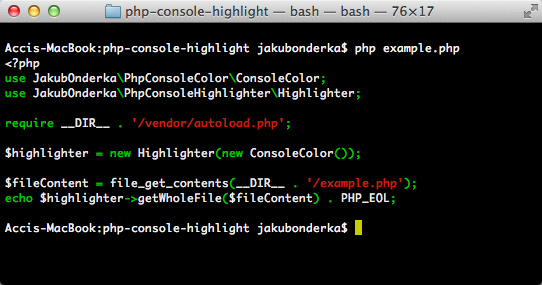
![Example](http://jakubonderka.github.io/php-console-highlight-example.png)

Install
-------

Just run the following command to install it:

    composer require --dev php-parallel-lint/php-console-highlighter:"0.*"

Usage
-------
```php
<?php
use JakubOnderka\PhpConsoleColor\ConsoleColor;
use JakubOnderka\PhpConsoleHighlighter\Highlighter;

require __DIR__ . '/vendor/autoload.php';

$highlighter = new Highlighter(new ConsoleColor());

$fileContent = file_get_contents(__FILE__);
echo $highlighter->getWholeFile($fileContent);
```

------

[![Downloads this Month](https://img.shields.io/packagist/dm/php-parallel-lint/php-console-highlighter.svg)](https://packagist.org/packages/php-parallel-lint/php-console-highlighter)

[![Build Status](https://travis-ci.org/php-parallel-lint/PHP-Console-Highlighter.svg?branch=master)](https://travis-ci.org/php-parallel-lint/PHP-Console-Highlighter)
[![License](https://poser.pugx.org/php-parallel-lint/php-console-highlighter/license.svg)](https://packagist.org/packages/php-parallel-lint/php-console-highlighter)
© 2026 GrazzMean
https://ai.shandianfk.com/wp-sitemap-posts-post-1.xmlhttps://ai.shandianfk.com/wp-sitemap-posts-page-1.xmlhttps://ai.shandianfk.com/wp-sitemap-taxonomies-category-1.xmlhttps://ai.shandianfk.com/wp-sitemap-taxonomies-post_tag-1.xmlhttps://ai.shandianfk.com/wp-sitemap-users-1.xml